

D2Coding Font for Clean and Readable Code
Discover D2Coding font built for developers to improve code readability, reduce eye strain, and create a smooth coding experience across editors and IDEs.
- Overview
What is D2Coding?
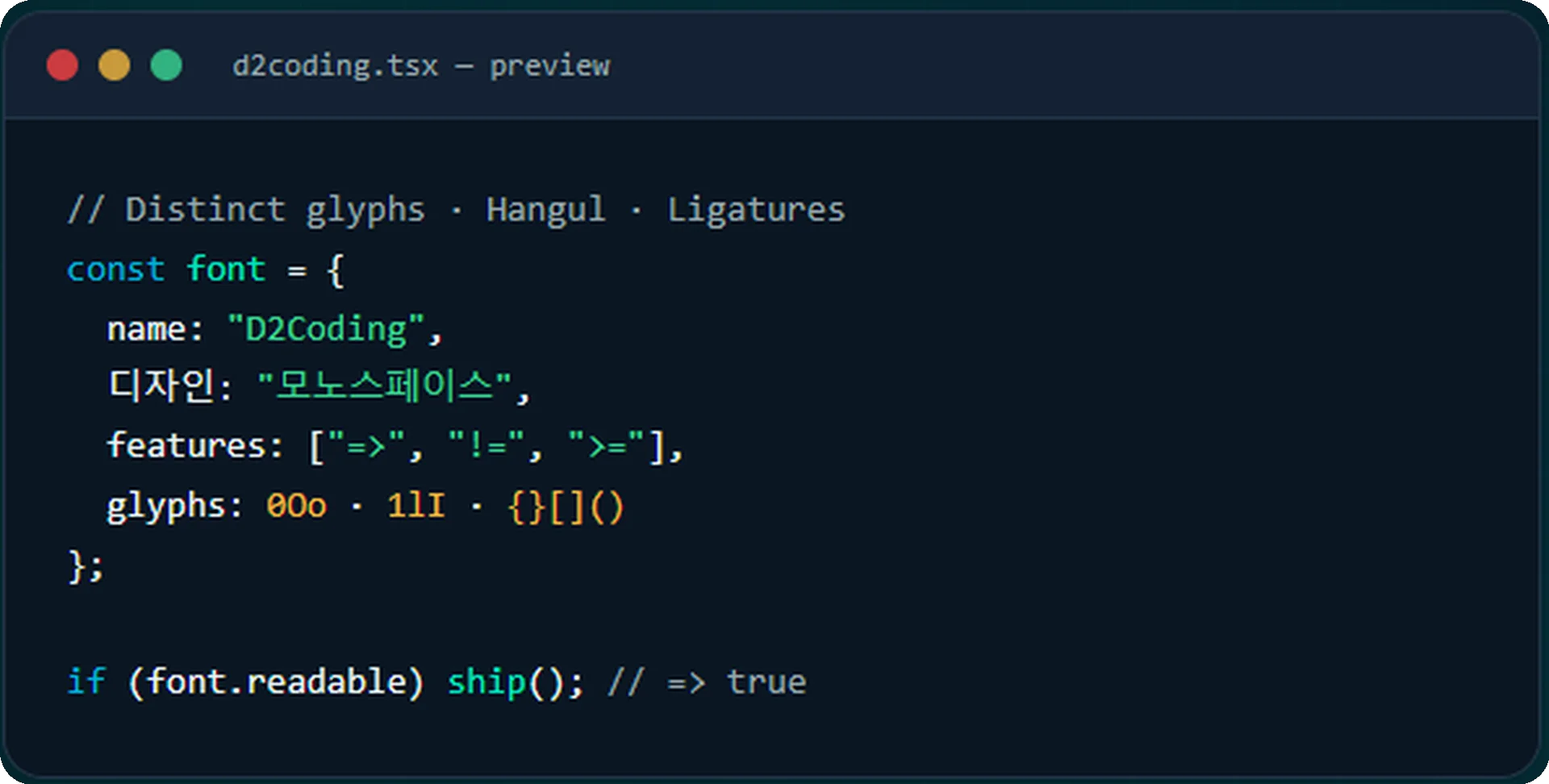
D2Coding is a thoughtfully designed monospaced font created specifically for developers who value clarity, consistency, and comfort while coding. Unlike regular fonts, every character in D2Coding occupies the same amount of horizontal space, ensuring that your code remains perfectly aligned and easy to scan. This uniform structure plays a crucial role in improving readability, especially when working with complex codebases or debugging detailed logic.
Built with a focus on simplicity, D2Coding avoids unnecessary styling and instead emphasizes clean character shapes that are easy to distinguish at a glance. This makes it easier to identify symbols, brackets, and similar-looking characters—reducing the chances of errors and saving valuable development time. Whether you’re writing scripts, reviewing code, or working on large projects, the font supports a smooth and distraction-free workflow.
- Why developers pick it
Features that make D2Coding shine
Monospaced Precision
D2Coding uses a consistent character width, ensuring perfect alignment of code. This helps developers easily scan lines, maintain structure, and avoid confusion in complex code blocks.
Enhanced Readability
The font is carefully designed to make each character clear and distinguishable. This improves readability and allows developers to quickly understand and debug their code.
Lightweight Performance
D2Coding is optimized for performance, meaning it loads quickly and runs smoothly without slowing down your code editor or development environment.
Eye-Friendly Design
Built for long coding sessions, the font reduces eye strain by maintaining balanced spacing and clean visuals, making it comfortable to use for extended periods.
Clear Character Differentiation
Similar-looking characters like “1”, “l”, and “I” are clearly distinguishable, helping prevent errors and improving overall coding accuracy.
Free & Open Source
D2Coding is completely free to use and open-source, allowing developers to use, modify, and share it without any restrictions.
- Workflow
How Does D2Coding Work?
Clear Structure Through Monospaced Design
D2Coding works on a monospaced system, where every character occupies the same amount of horizontal space. This consistent spacing ensures that your code stays perfectly aligned, making it easier to read, scan, and maintain. Whether you are working with complex logic or simple scripts, the structured layout helps you understand your code at a glance.
Improved Character Clarity
One of the key ways D2Coding enhances your coding experience is through its carefully designed characters. It clearly distinguishes between commonly confusing symbols such as “1”, “l”, and “I”. This reduces the chances of misreading code and helps developers avoid small but critical errors.
Optimized for Long Coding Sessions
D2Coding is designed with developer comfort in mind. Its balanced spacing and clean letterforms reduce visual fatigue, allowing you to code for longer periods without unnecessary strain on your eyes. This makes it especially useful for professionals who spend hours in front of a screen.
Seamless Integration with Development Tools
D2Coding works effortlessly across popular code editors, IDEs, and terminal environments. Once installed, you can easily select it as your default font in your preferred development tool and immediately benefit from its improved readability and clean appearance.
Simple Setup, Instant Results
Getting started with D2Coding is straightforward. After downloading and installing the font, you only need to select it in your editor settings. There’s no complex configuration required—just apply the font and start coding with a clearer, more organized view.
Designed to Enhance Productivity
By improving readability and reducing visual confusion, D2Coding helps developers work more efficiently. It allows you to quickly identify errors, understand code structure, and stay focused, ultimately leading to a smoother and more productive coding workflow.
- Live Preview
See D2Coding in action
Numbers
0123456789
Brackets
{ [ ( ) ] }
Operators
=> != >= <= ===
- Setup
Installation Guide
- Configuration
Configure your IDE
"editor.fontLigatures": true
Font: D2Coding
Enable ligatures: ✓
Font: D2Coding 13pt
- Benefits
Benefits of Using D2Coding
Enhanced Code Readability
D2Coding makes your code easier to read by maintaining consistent spacing and a clean visual structure. Every line appears well-organized, helping you quickly understand even complex code without confusion.
Faster Error Detection
With clearly distinguishable characters and proper alignment, D2Coding allows you to spot mistakes more efficiently. Small errors that are often missed in other fonts become easier to identify and fix.
Reduced Eye Strain
Long coding sessions can be tiring, but D2Coding is designed to minimize visual fatigue. Its balanced letterforms and spacing provide a comfortable viewing experience, allowing you to work for extended periods without strain.
Improved Coding Efficiency
When your code is easier to read and navigate, your overall workflow becomes faster. D2Coding helps you stay focused, write cleaner code, and complete tasks more efficiently.
Better Code Structure and Alignment
Thanks to its monospaced design, your code maintains perfect alignment. This makes indentation, spacing, and formatting more consistent, which is essential for writing clean and professional code.
Seamless Development Experience
D2Coding integrates smoothly with most development environments, ensuring a hassle-free experience. Once applied, it enhances the overall look and feel of your workspace without requiring extra setup.
Ideal for Beginners and Professionals
Whether you are just starting your coding journey or working as an experienced developer, D2Coding provides a reliable and user-friendly font that supports all levels of programming.
- Programming Ligatures
Beautiful symbol combinations
- Comparison
D2Coding vs other coding fonts
| Feature | D2Coding | Fira Code | Consolas | JetBrains Mono |
|---|---|---|---|---|
| Hangul Support | Excellent | None | None | Limited |
| Ligatures | Yes | Yes | No | Yes |
| License | OFL Free | OFL Free | Free | OFL Free |
| Glyph Distinction | ★★★★★ | ★★★★ | ★★★ | ★★★★ |
| File Size | 3.7 MB | 5.1 MB | 0.4 MB | 1.2 MB |
- Honest Review
Pros and cons of D2Coding
- ✔ Free and open-source under SIL OFL
- ✔ Outstanding Hangul rendering
- ✔ Distinguishable glyphs reduce eye strain
- ✔ Programming ligatures available
- ✔ Lightweight and fast to load
- ✔ Active community and updates
- ✖ Limited weight variants (Regular & Bold only)
- ✖ No italic style included
- ✖ Designed primarily for screen, not print
- ✖ Some may prefer rounder modern fonts
- Use Cases
Where Can You Use D2Coding?
D2Coding is designed to work smoothly across a wide range of development environments, making it a versatile choice for every type of programmer. No matter which tools you prefer, you can easily apply D2Coding and instantly improve your coding experience.
Code Editors
D2Coding works perfectly with modern code editors like Visual Studio Code and Sublime Text. These editors allow you to quickly set D2Coding as your default font, giving your code a clean, consistent, and highly readable appearance.
Integrated Development Environments (IDEs)
For more advanced development, D2Coding integrates seamlessly with powerful IDEs such as IntelliJ IDEA and PyCharm. Whether you’re working on large-scale applications or complex projects, the font helps maintain clarity and structure throughout your codebase.
Terminal & Command Line
D2Coding is also ideal for terminal and command-line interfaces. Its clear character design ensures commands and outputs are easy to read, reducing confusion and making system-level tasks more efficient.
Cross-Platform Compatibility
D2Coding can be used across different operating systems, including Windows, macOS, and Linux. This flexibility ensures a consistent coding experience, no matter where you work.
- Gallery
In the wild

- Pro Tips
Get the most out of D2Coding
- Loved by developers
What people are saying
- FAQ
Frequently Asked Questions
What is D2Coding?
D2Coding is a monospaced programming font designed to improve code readability and provide a cleaner coding experience for developers.
Is D2Coding free to use?
Yes, D2Coding is completely free and open-source, making it accessible for personal and professional development projects.
Why do developers use D2Coding?
Developers use D2Coding because of its clean design, clear character distinction, and comfortable readability during long coding sessions.
What makes D2Coding different from other coding fonts?
D2Coding focuses on simplicity, readability, and proper spacing, helping developers reduce visual confusion while writing code.
Is D2Coding suitable for beginners?
Yes, D2Coding is beginner-friendly and helps new programmers read and understand code more easily.
Does D2Coding reduce eye strain?
Yes, its balanced spacing and clean character shapes are designed to provide a more comfortable viewing experience.
Can I use D2Coding in VS Code?
Yes, D2Coding works perfectly with Visual Studio Code and can be selected through the editor’s font settings.
Does D2Coding support multiple programming languages?
Yes, D2Coding supports a wide range of programming languages and coding environments.
Is D2Coding a monospaced font?
Yes, D2Coding is a monospaced font, meaning each character occupies equal horizontal space for proper code alignment.
Can I use D2Coding on Windows, macOS, and Linux?
Yes, D2Coding is compatible with major operating systems, including Windows, macOS, and Linux.
Is D2Coding good for long coding sessions?
Yes, D2Coding is optimized for long hours of coding by improving readability and reducing visual fatigue.
Does D2Coding work with terminals?
Yes, D2Coding can be used in terminal and command-line interfaces for a cleaner and more organized appearance.
How do I install D2Coding?
You can install D2Coding by downloading the font file, installing it on your system, and selecting it in your code editor settings.
Can D2Coding improve productivity?
Yes, improved readability and clearer character distinctions can help developers identify errors faster and work more efficiently.
Does D2Coding support ligatures?
D2Coding primarily focuses on clarity and simplicity rather than decorative ligatures.
Is D2Coding lightweight?
Yes, D2Coding is lightweight and performs smoothly across different development environments.
Can designers use D2Coding?
Although mainly designed for developers, designers and technical writers can also use D2Coding for clean text formatting.
Does D2Coding help with debugging?
Yes, the font’s clear structure makes it easier to read code and detect mistakes during debugging.
Is D2Coding customizable?
You can customize its size and appearance through your editor or operating system settings.
Who should use D2Coding?
D2Coding is ideal for programmers, developers, students, software engineers, and anyone who spends significant time working with code.