
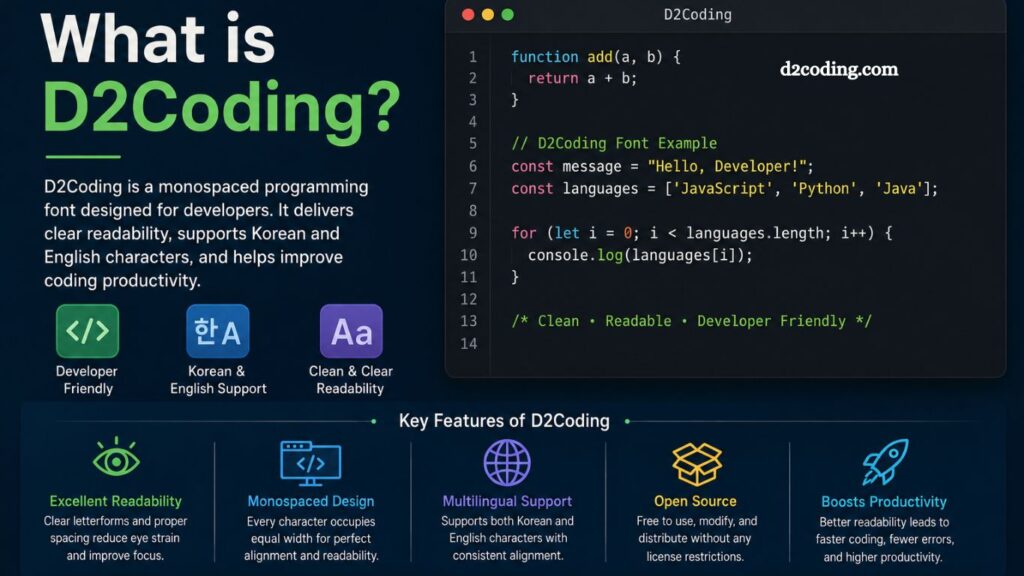
Developers spend countless hours staring at code editors, terminals, and programming tools every single day. Clear readability and comfortable text display can dramatically improve productivity, reduce eye strain, and create a smoother coding experience. D2Coding has become a popular solution among programmers searching for a clean and developer-friendly font.
D2Coding is a monospaced programming font specially designed for coding environments. Built to improve code readability, this font supports both English and Korean characters while maintaining perfect spacing and alignment. Many developers prefer D2Coding because it creates a neat visual structure that makes coding easier and more efficient.
Modern programmers often customize their development environments to boost comfort and performance. Choosing the right coding font plays a major role in that setup. D2Coding stands out because of its balanced design, ligature-free structure, and excellent readability across different screen sizes.
Understanding D2Coding
D2Coding is an open-source monospaced font created specifically for programmers. Naver Corporation originally developed this font to provide better readability for coding tasks. Since its release, D2Coding has gained popularity among software developers, web designers, students, and IT professionals worldwide.
Unlike regular fonts used in documents or websites, coding fonts require precise spacing and clear character distinction. D2Coding ensures that every character occupies the same amount of horizontal space. This fixed-width design helps developers align code correctly and detect syntax structures more easily.
Read More: What is D2Coding?
Many programming fonts struggle with character confusion. Similar-looking characters such as zero “0,” capital “O,” lowercase “l,” and number “1” often create readability issues. D2Coding solves this problem with carefully crafted letterforms that improve visual clarity.
Key Features of D2Coding
D2Coding offers several features that make it highly attractive for developers and programmers.
Excellent Readability
Readability remains one of the strongest advantages of D2Coding. Every character appears sharp, balanced, and easy to distinguish. Developers working on large projects can quickly scan through code without unnecessary visual strain.
Clear punctuation symbols and properly spaced characters also improve code comprehension. Brackets, semicolons, commas, and operators remain highly visible even in dense code blocks.
Monospaced Design
D2Coding uses a fixed-width layout where every character occupies equal space. This design improves indentation accuracy and maintains consistent alignment throughout source code.
Proper spacing becomes especially useful when working with:
- Python scripts
- Java applications
- HTML and CSS files
- JavaScript frameworks
- Terminal commands
- Configuration files
Developers can identify structural errors faster because indentation patterns remain visually organized.
Korean and English Language Support
One major strength of D2Coding lies in its multilingual support. Many coding fonts focus mainly on English characters, but D2Coding handles Korean text exceptionally well.
Korean developers often use comments and documentation inside source code. D2Coding ensures both Korean and English characters align perfectly without breaking formatting consistency.
Open-Source Availability
D2Coding remains completely free to use. Developers can download, modify, and distribute the font without licensing restrictions. Open-source accessibility makes it popular among students, startups, and software companies.
Many programmers appreciate tools that encourage community-driven development, and D2Coding fits perfectly into that philosophy.
Comfortable Coding Experience
Long coding sessions often lead to eye fatigue and reduced concentration. D2Coding minimizes visual clutter with balanced spacing and clean typography.
Smooth readability helps developers maintain focus during debugging, code reviews, and software development tasks.
Why Developers Prefer D2Coding
Developers constantly search for tools that improve workflow efficiency. Fonts may seem like a small detail, but typography significantly impacts productivity and coding accuracy.
D2Coding offers several advantages that attract professional programmers.
Reduced Character Confusion
Programming requires precise attention to detail. A single character mistake can break an entire application. D2Coding minimizes confusion between similar-looking symbols and letters.
Examples include:
- Zero “0” vs letter “O”
- Lowercase “l” vs number “1”
- Curly braces vs parentheses
- Commas vs periods
Clear differentiation reduces coding errors and speeds up debugging.
Better Visual Balance
D2Coding maintains consistent letter spacing and proportional structure. Balanced typography creates a cleaner interface inside coding editors.
Many developers describe D2Coding as visually calming because of its organized appearance.
Enhanced Productivity
Comfortable readability allows programmers to process information faster. Developers can navigate through large files more efficiently and spend less time identifying syntax errors.
Productivity improvements become especially noticeable during:
- Backend development
- Frontend design
- Software testing
- Database management
- System administration
- Lightweight Performance
Some fonts consume additional system resources or render poorly on lower-resolution displays. D2Coding performs smoothly across multiple devices and operating systems.
Developers using older hardware often appreciate its lightweight performance and stable rendering quality.
D2Coding vs Other Programming Fonts
Programming fonts vary widely in design and functionality. Developers often compare D2Coding with other popular coding fonts such as:
- Fira Code
- JetBrains Mono
- Consolas
- Source Code Pro
- Cascadia Code
Each font offers unique advantages, but D2Coding focuses strongly on simplicity and readability.
D2Coding vs Fira Code
Fira Code includes programming ligatures that combine symbols into visual shortcuts. Some developers enjoy ligatures, while others prefer traditional character separation.
D2Coding avoids ligatures entirely, creating a cleaner and more familiar coding environment.
D2Coding vs JetBrains Mono
JetBrains Mono emphasizes modern aesthetics and advanced typography. D2Coding focuses more on practical readability and multilingual support.
Korean developers often prefer D2Coding because of its superior Korean text rendering.
D2Coding vs Consolas
Consolas comes preinstalled on many Windows systems and remains widely used. However, D2Coding offers better distinction between similar characters and more balanced spacing.
Many programmers switch from Consolas to D2Coding for improved long-term reading comfort.
Best Use Cases for D2Coding
D2Coding works exceptionally well across many programming environments and development tools.
Integrated Development Environments (IDEs)
Developers commonly use D2Coding inside IDEs such as:
- Visual Studio Code
- IntelliJ IDEA
- Eclipse
- PyCharm
- Android Studio
Its clean rendering improves code visibility inside complex projects.
Terminal Applications
Command-line interfaces benefit greatly from monospaced fonts. D2Coding displays terminal commands clearly while maintaining alignment consistency.
System administrators and DevOps engineers often use D2Coding for shell scripting and server management.
Web Development
Frontend and backend developers appreciate D2Coding because it handles HTML, CSS, JavaScript, and framework syntax cleanly.
Readable code improves collaboration among development teams.
Educational Coding Environments
Students learning programming often struggle with confusing symbols and inconsistent formatting. D2Coding creates a beginner-friendly environment that simplifies code reading.
Teachers and coding instructors frequently recommend developer-focused fonts to improve learning experiences.
How to Install D2Coding
Installing D2Coding remains simple across different operating systems.
Windows Installation
- Download the D2Coding font package.
- Extract the ZIP file.
- Right-click the font file.
- Select “Install.”
- Restart your code editor if necessary.
macOS Installation
- Download the font files.
- Open Font Book.
- Drag D2Coding into the application.
- Confirm installation.
Linux Installation
- Download the font package.
- Copy files into the fonts directory.
- Refresh the font cache.
- Restart applications.
After installation, developers can select D2Coding from their editor settings.
Best Settings for D2Coding
Optimizing font settings improves readability even further.
Recommended Font Size
Most developers prefer font sizes between:
- 12px for compact layouts
- 14px for balanced readability
- 16px for larger displays
Choosing the correct size depends on monitor resolution and personal comfort.
Line Height Adjustment
Increasing line spacing slightly can improve visual separation between code lines.
Many programmers use:
- 1.4 line height
- 1.5 line height
Additional spacing reduces visual clutter during long coding sessions.
Dark Theme Compatibility
D2Coding works exceptionally well with dark editor themes. Balanced typography and clean strokes remain visible without excessive brightness.
Popular dark themes include:
- Dracula
- One Dark Pro
- Monokai
- Nord
- GitHub Dark
Benefits of Choosing the Right Coding Font
Programming fonts directly affect coding efficiency and mental comfort. Developers often underestimate typography until they experience noticeable improvements after switching fonts.
Choosing a high-quality coding font like D2Coding provides benefits such as:
- Faster code scanning
- Improved syntax recognition
- Reduced eye strain
- Better concentration
- Cleaner workspace aesthetics
Comfortable visual environments support better long-term productivity.
Common Misconceptions About D2Coding
Several misconceptions surround programming fonts and developer tools.
“Fonts Don’t Affect Productivity”
Many beginners assume fonts make little difference. Professional developers often disagree because readability impacts coding speed and debugging accuracy.
Small visual improvements accumulate significantly over time.
“D2Coding Works Only for Korean Developers”
Although D2Coding supports Korean exceptionally well, international developers also use it extensively. English rendering remains highly polished and professional.
“Fancy Fonts Always Work Better”
Stylized fonts with complex ligatures may look impressive initially, but simplicity often improves practical coding performance. D2Coding prioritizes function over decoration.
Future Popularity of D2Coding
Developer-focused typography continues evolving as programming environments become more advanced. D2Coding remains highly relevant because of its clean design philosophy and practical usability.
Growing interest in remote work, software engineering, and coding education also increases demand for readable programming fonts.
As more developers recognize the importance of typography, D2Coding will likely maintain strong popularity within programming communities.
Frequently Asked Questions
What is D2Coding used for?
D2Coding is a monospaced programming font designed to improve code readability and reduce eye strain for developers.
Is D2Coding free to use?
Yes, D2Coding is completely free and open-source, allowing developers to use and distribute it without licensing fees.
Which programming editors support D2Coding?
D2Coding works with popular editors and IDEs like Visual Studio Code, PyCharm, IntelliJ IDEA, Eclipse, and Sublime Text.
Does D2Coding support Korean characters?
Yes, D2Coding provides excellent support for both Korean and English characters with consistent alignment and spacing.
Why do developers prefer D2Coding?
Developers prefer D2Coding because of its clean typography, clear character distinction, and comfortable long-term readability.
Can D2Coding reduce coding mistakes?
Yes, D2Coding helps reduce coding errors by clearly distinguishing similar-looking characters such as “0,” “O,” “1,” and “l.”
Is D2Coding suitable for beginners?
Yes, beginners often find D2Coding helpful because its readable design makes learning programming easier and less confusing.
Conclusion
D2Coding stands out as a reliable and developer-friendly programming font designed for better readability and coding comfort. Clean spacing, clear character distinction, and multilingual support make it an excellent choice for both beginners and professional developers. Whether working on web development, software engineering, or terminal-based tasks, D2Coding helps create a smoother and more productive coding experience.